How to Spot a Fake Remote Job Posting: 9 Warning Signs
Written by Ron Kloth, Founder of NomadJobPass.
You will encounter fake remote job postings in your search. It's a matter of when, not if. The good news: nearly all of them share a handful of tells, and once you know them you can screen out a scam in a couple of minutes.
The U.S. Federal Trade Commission reports that people lost roughly $286 million to online job scams in 2023, and that reports have tripled since 2020, with "gamified" task scams driving record losses (FTC). Remote seekers are hit hardest, because location-independent roles are exactly what scammers advertise.
This guide gives you a clear framework to spot fake postings before you apply: nine unmistakable red flags, how scammers actually operate (including AI-powered fakes), and a step-by-step way to verify any listing. At NomadJobPass, radical honesty isn't a tagline, so this guide is written to protect you wherever you apply, not just on our platform.
Why are remote job seekers a prime target for scammers?
Remote seekers are vulnerable: you apply from abroad (harder to verify), you're excited about the lifestyle (easy to overlook flags), you don't know local hiring norms, and time-zone gaps make off-platform chat acceptable. Scammers clone real postings, spread them across boards, move you to WhatsApp/Telegram, rush the process, and ask for money. Once you pay, they vanish. Assume you'll meet one fake posting. Verify every opportunity.
The demand for remote work has created a huge pool of hopeful applicants, and scammers cast a wide net to catch the most eager ones.
You're particularly exposed as a digital nomad because you often apply from abroad, which makes verification harder. You're excited about the lifestyle, so it's easy to overlook red flags. You may not know local hiring norms. And time-zone gaps make you more willing to accept off-platform chat.
Most job scams follow the same script. They clone a real posting from a legitimate company, spread it across job boards and social media, wait for applications, then move you off-platform to text, WhatsApp, or Telegram. The "hiring process" is suspiciously fast and easy, and at some point they ask for money (equipment, background checks, training, or "unlocking" your earnings). Once you pay, they vanish.
For legitimate opportunities, start with our guide on finding a truly global remote job.
What are the 9 red flags of a fake remote job posting?
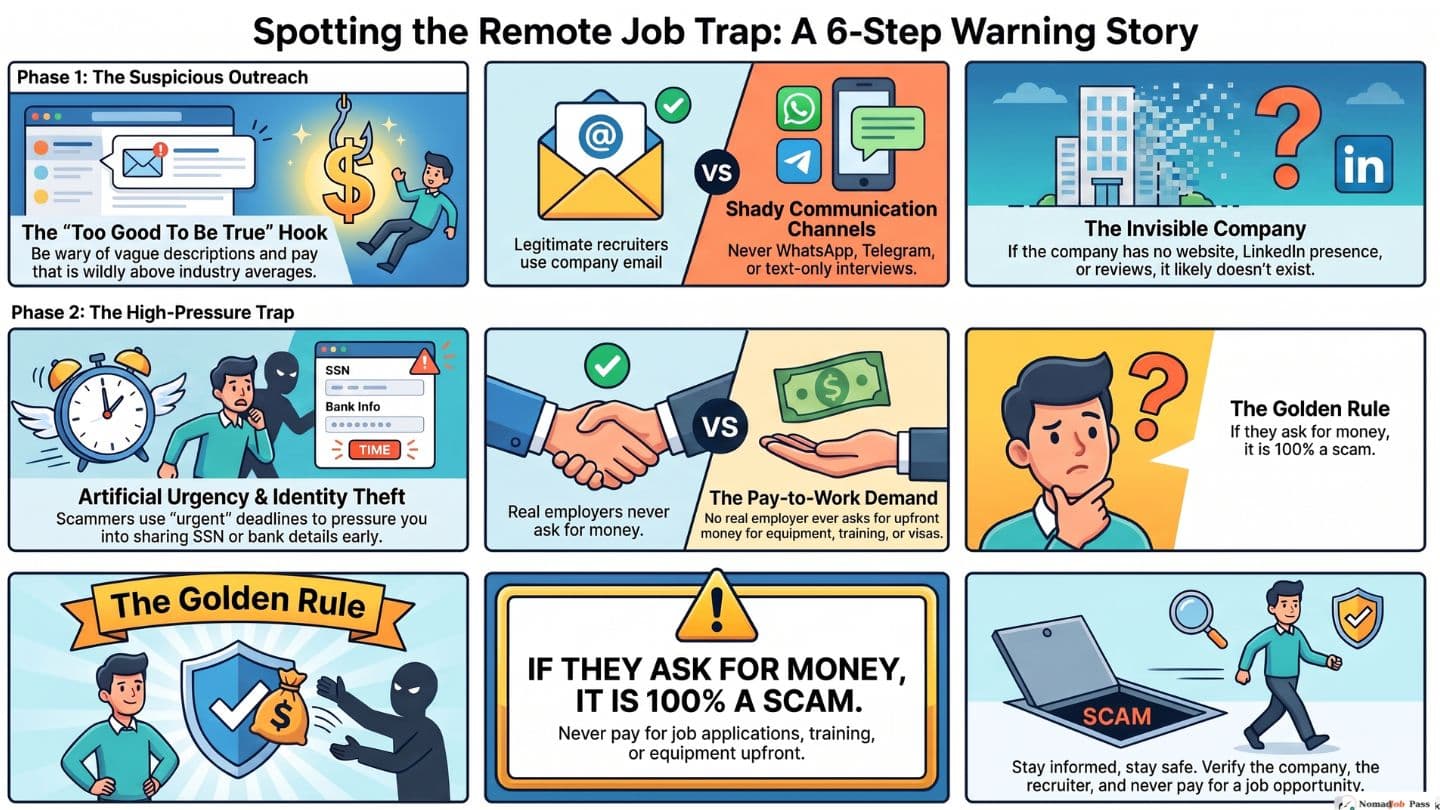
One flag = caution. Three or more = walk away. Red flags: unrealistic pay + no interview, vague descriptions ("various tasks"), asks you to pay anything upfront, urgency pressure, company impossible to find online, asks sensitive info too early, unprofessional communication (bad grammar, generic "Dear Applicant"), offering you a job without conversation, or contact through WhatsApp/Telegram instead of company email.
Apply this checklist to every posting. One red flag warrants caution. Three or more? Walk away.
Red Flag #1: The pay is too good to be true
Legitimate companies pay market rates. If a role offers $100/hour for data entry or $10,000/month for simple admin work, it's a scam. I see this quite a bit if you are going to use a site like Reddit to look for jobs.
What to check: compare the pay to typical ranges. Remote customer support usually pays around $15–30/hour. Experienced software roles $50–100+/hour. Anything wildly above the norm deserves a hard look.
Red Flag #2: You get a job offer without an interview
No legitimate company hires without at least one real conversation. Employers want to confirm you're qualified and a fit.
The exception: freelance marketplaces (Upwork, Fiverr) award projects without interviews, but that's gig work, not employment. For an actual job, expect an interview.
Red Flag #3: The job description is vague and generic
Scammers don't understand the role they're faking, so they paste generic text.
What to look for: no specific responsibilities or outcomes. Filler like "various tasks" or "help the team". No mention of the tools or systems you'd actually use. Bullets that could describe any job.
Red Flag #4: They contact you out of the blue via text or WhatsApp
Legitimate recruiters use a company email and professional channels. Primary contact through WhatsApp, Telegram, or SMS is a warning sign.
What to know: some international recruiters do use WhatsApp. The tell is whether they're willing to verify themselves and keep the conversation professional.
Red Flag #5: They ask you to pay money or buy equipment upfront
This is the biggest red flag of all. No legitimate employer asks you to pay for background checks, training, equipment, visa fees, "premium" listings, or to "unlock" or "activate" earnings.
Real employers provide equipment or reimburse you: they never ask you to pay first.
Red Flag #6: The communication is unprofessional
Scammers lean on machine translation and AI-generated text. Watch for:
- Poor grammar, spelling, or punctuation
- Oddly formal or oddly casual tone
- Generic greetings like "Dear Applicant" or "Hello Candidate"
- No signature, company details, or contact info
Red Flag #7: The company is impossible to find online
A real company has a website, a LinkedIn page, and often reviews on Glassdoor or Comparably.
What to do: find the company's official site yourself (don't use the link in the posting). Check for a professional site, a real address, named leadership, and recent activity. If the only web presence is the posting itself, that's a red flag.
Red Flag #8: They pressure you to act immediately
"Urgent." "Immediate hiring." "Only 2 spots left." That pressure is designed to stop you thinking critically or verifying. Legitimate employers give you time: they don't rush you into an offer or a payment.
Red Flag #9: They ask for sensitive personal information too early
Scammers harvest personal data (PII) for identity theft. These should be requested only at the final-offer stage, through a secure onboarding portal, never by email or text:
- Social Security number (or equivalent)
- Passport number or photo
- Driver's license number
- Bank account information
- Tax ID
How do scammers actually steal your money and identity?
Four main tactics: (1) Task scams, small payout builds trust, then they ask you to pay to "unlock" earnings (climbs until they disappear). (2) Fake checks, mail you a check for equipment, you forward funds, check bounces weeks later and you're liable. (3) Identity harvesting, one application hands over enough PII for credit card fraud or tax ID theft. (4) AI deepfakes, clone employee voices, run deepfake interviews, generate fake websites. Traditional verification ("trust your eyes") no longer works. You need a systematic process.
Beyond the red flags, it helps to understand how the profit actually happens.
The task scam: the "legitimate" trap
The fastest-growing remote job scam is the task scam:
- You're offered a simple "task" role, data entry, ad rating, product testing.
- They pay you a small amount ($20–$50) to build trust. The money really arrives.
- They say more work is available, but you must pay to "unlock" or "activate" your account.
- You pay. Sometimes you get another small payout.
- The required payments climb. You keep paying. Eventually they disappear.
Why it works: the first real payout makes it feel legitimate. The FTC now singles these out as driving record losses.
The fake-check scam
They mail you a check for "equipment," ask you to deposit it and forward part of the funds to a "vendor." You do. The check bounces weeks later, and you're on the hook for the full amount.
Identity harvesting
A single application can hand over enough PII to open credit cards, take out loans, or file fraudulent tax returns in your name.
The AI twist: deepfakes and cloned voices
Scammers now use AI to clone employee voices for "confirmation" calls, run deepfake video interviews, generate convincing company emails, and build polished fake websites. "Trust your eyes" no longer works. You need a verification process, not a gut feeling.
Apply for jobs safely with our full overseas job application checklist.
How can you verify if a remote job posting is legitimate?
Six-step verification process (15 minutes): (1) Go to company's official website independently (don't click posting link). (2) Check LinkedIn and Glassdoor for real employees and reviews. (3) Verify recruiter's LinkedIn profile (not brand-new, shows company affiliation). (4) Paste first sentence of job description into Google, if it appears under multiple company names, it's cloned. (5) Check government business registry (Secretary of State, Companies House, ASIC). (6) Trust your gut if something still feels wrong after checks. Scammers rarely register legally.
Take 15 minutes and run this on any role that interests you.
Step 1: Go to the company's official website
Don't click the link in the posting, search the company independently and go to its real site. Confirm it exists, matches the posting, has a careers page listing the same role, and uses its own domain (not a free Gmail/Hotmail).
Step 2: Check LinkedIn and employee reviews
Search the company on LinkedIn. Does it have a page and real employees (with photos, history, connections)? A company with zero or one employee is suspicious. Then check Glassdoor, Comparably, or Indeed for genuine reviews.
Step 3: Verify the recruiter's identity
The recruiter should have a LinkedIn profile that shows their role at the company, fits its hiring practices, and isn't a brand-new account with no activity.
Step 4: Search for the exact job description
Paste the first sentence of the description into Google. If the same text appears under several unrelated company names, you've found a cloned posting.
Step 5: Verify the employer's legal registration
Legitimate employers are registered with government authorities. Cross-check the country they claim to operate in:
| Country | Registry | What to check |
|---|---|---|
| United States | Secretary of State business search (by state) | Company exists, active, has a registered agent |
| United Kingdom | Companies House | Registration number, active status |
| European Union | Each country's commercial register | Legal entity, VAT number, registered address |
| Australia | ASIC Connect | ABN/ACN, status, officeholders |
| Canada | Corporations Canada or provincial registries | Corporation number, status, registered office |
| Singapore | ACRA | UEN, status, directors |
If a company says it's a "US company" but isn't registered in any US state, that's a red flag. Scammers rarely bother to register.
Step 6: Trust your gut after doing the checks
If something still feels wrong after all this, walk away. There's always another opportunity.
Once you've verified the job, make your application strong with our résumé format guide for digital nomads.
What information can you safely share (and when)?
Early (before interview): name, email, phone, LinkedIn, work samples. After verification: full address, manager's name. Final offer stage only (secure portal): SSN/equivalent, passport, bank details, tax ID. Never: credit card, payment details, any account logins. If a company asks for payment or sensitive PII before an interview or offer, it's a scam. Simple rule: if money or sensitive info is requested before you've spoken to them on video, walk away.
Safe early: first and last name, a professional email, a mobile number, your LinkedIn URL, work samples/portfolio/GitHub, and your current role.
Wait until you've verified the company: full address, the recruiter's and their manager's names.
Share only at the final-offer stage, through a secure portal: Social Security number (or equivalent), passport/government ID, bank details for direct deposit, and tax information.
Never share: your credit card number, any payment, or logins/passwords to any account.
The simple rule: if a company asks for payment details before offering you a job, or sensitive PII before an interview, it's a scam.
What should you do if you've been scammed?
Six immediate actions: (1) Cut contact, block them. (2) Report to FTC/FBI (ReportFraud.ftc.gov, IC3.gov) or your country's fraud agency. (3) Call your bank to block transactions and reissue cards. (4) Freeze credit if you shared SSN (Experian, Equifax, TransUnion). (5) Report the posting to the job board. (6) Monitor statements for months, warn nomad communities. Report it, act fast, and warn others in your community.
- Cut contact. Stop responding. Send no more money or information.
- Report it. In the US, the FTC at ReportFraud.ftc.gov and the FBI at IC3.gov. UK: Action Fraud (actionfraud.police.uk). Canada: Canadian Anti-Fraud Centre (antifraudcentre.ca). Australia: Scamwatch (scamwatch.gov.au). Elsewhere, search "[your country] fraud reporting," and for cross-border cases use econsumer.gov.
- Call your bank. If you shared financial details, ask them to block transactions and reissue cards.
- Freeze your credit. If you shared a Social Security number or similar, freeze it with the major bureaus (in the US: Experian, Equifax, TransUnion) so no one can open accounts in your name.
- Report the posting to the board it came from (LinkedIn, Indeed, Google Jobs), or to us at support@nomadjobpass.com if you saw it via NomadJobPass.
- Monitor and warn others. Watch your statements for a few months, and post a heads-up in nomad communities so others don't fall for the same scam.
If you've been applying with AI-generated résumés, you may be making yourself an easier target. See why your AI résumé is getting you ghosted.
How does NomadJobPass fit into staying safe?
NomadJobPass pulls from established remote-job feeds (Remotive, Arbeitnow, Himalayas), screening out spray-and-pray scams. But no aggregator individually vets every employer, which is why this guide exists. Spot something suspicious? Report it. Your data stays yours (résumé used only for document generation, never sold, never submitted without your approval).
Here's the honest version, because that's the whole point.
Our Job Board pulls from established remote-job feeds (Remotive, Arbeitnow, Himalayas) rather than accepting open public submissions. That alone screens out a lot of the spray-and-pray scam volume you'd see on a general "post anything" board.
But we don't individually vet every employer, and we won't pretend to. No aggregator can guarantee that every listing is legitimate, which is exactly why we wrote this guide: so you can verify any posting yourself, on our board or anywhere else. If you spot something suspicious on our board, tell us at support@nomadjobpass.com and we'll look into it and remove it if warranted.
And your data stays yours. We use your résumé only to generate your documents, we never sell it, and nothing is submitted to any employer on your behalf.
Sources
- USC Career Center: 3 Tips to Identify and Avoid Fraudulent Job Postings. University guidance on spotting job scam tactics and red flags in postings.
- BYU Pathway Career Services: How to Identify Fake Job Postings. Best practices for verifying legitimate job opportunities and avoiding fraud.
- Newcastle University Careers: Fake Jobs. Academic career guidance on job scam identification and employer verification.
- University of Maryland Career Services: Avoiding Job Scams. Comprehensive resources on recognizing scam tactics and protecting personal information.
Your next step: apply with confidence
Remote job scams are a real threat, but they're avoidable. Understand how scammers operate, run the same verification steps every time, and you'll protect your money, your time, and your identity, while the genuine opportunities (and there are many) still get through.
Ready to start a safer search? Upload your résumé and tailor a strong application to a real role. Work from anywhere, and keep your guard up.